
Purdue University Libraries website
Academic library website used by over 40,000 students and faculty
I worked as the only designer and researcher to lead the redesign effort. I applied a typical user-centered design process for this project, starting from user research, persona creation, prototyping, implementation, to iterative user testing.
Background
The Purdue University Libraries website is a significant part of the Libraries’ services. The previous website was built on static HTML pages. Content was difficult to update and user experience was not consistent across the website.
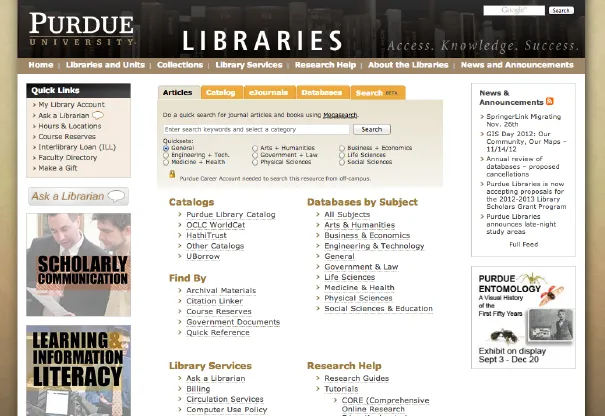
From users:
Too many and often redundant links.
Difficult to find information.
With a new design, the website would be built using Drupal, which would make maintaining content and visual design much easier.
Design process
I followed a typical user-centered design process. Working with a small development team and relatively flexible schedule, I started both user research and information architecture work around the same time. I used user research to generate personas and user stories, which proved to be a key communication tool with stakeholders. I also conducted a thorough content inventory on the legacy site, which revealed a good amount of outdated and unused content. With the research and content ground work done, I worked on a set of wireframes and used user tests to iterate the designs before implementation.

User research
I conducted contextual inquiries and interviews with graduate students, faculty, and librarians to understand their information seeking behavior, preferences, and requirements. My research focused on users’ library experience, use of library resources and services, study and research needs, and general information needs. From the research I identified user segments, summarized user stories, and then developed personas.
Personas
Jenny
Sophomore, English major
"I use the library website to find papers and books."
Library Experience
- She visits the library website occasionally for basic information like locations and hours.
- She knows there is article search, course reserve and catalog on the homepage because it is very noticeable.
- She is not familiar with other links or content on the homepage and finds the site difficult to explore because she is used to simpler websites like Google or Facebook.
- She has very limited knowledge of how to use any of the advanced search options or facets to refine search results.
Goals
- Find journal articles for a research methods class (English 203).
- Find books on the course reserve for study.
- Find books for leisure reading.
- Need to know information about the libraries such as tutorials, study rooms, equipment, and student job opportunities.
Information Needs
- Information about library facilities beyond just locations and hours.
- A simple to use article search tool.
- A simple to use book (catalog) search tool.
- Guidance of using the library website including tutorials, guides, and introduction of databases.
Brian
3rd year PhD student, Chemical Engineering major
"Google Scholar is great. But sometimes I have to use the library website to get fulltext papers."
Library Experience
- He mostly uses Google Scholar to search for journal articles. But when there is no full text available on Google Scholar or the link on Google Scholar does not include full text access information, he resorts to the library website.
- He knows the best databases for his research area. He uses the library website to enter those databases in order to gain full text access. Occasionally, he uses the catalog to find books for research needs.
Goals
- Find the fulltext of journal articles searched on Google Scholar through the library website or interlibrary loan.
- Enter frequently used databases.
Information Needs
- A powerful but simple to use article search tool with more streamlined workflow similar to Google Scholar.
- Better integration of interlibrary loan and the search tools.
- Quick access to frequently used databases.
Kate
Associate Professor, Pharmacy
"I trust the library website more than Google Scholar."
Library Experience
- She has ample experience of using the library website and working with librarians.
- Her main concern is that the library website is difficult to navigate, and sometimes she cannot remember where to find certain information or get the search results she expects.
- She always uses advanced search options so she can have more control.
- She also uses facets to narrow down the search results.
Goals
- Find fulltext of journal articles.
- Enter frequently used databases.
- Work with librarians to develop subject guides.
- Need to show students how to use the library website.
Information Needs
- Credible and high quality search results.
- Flexible and easy to understand search and results refine options.
- Better navigation of library guides and the library website.
- Better understanding of library service, events, and research projects.
Content inventory
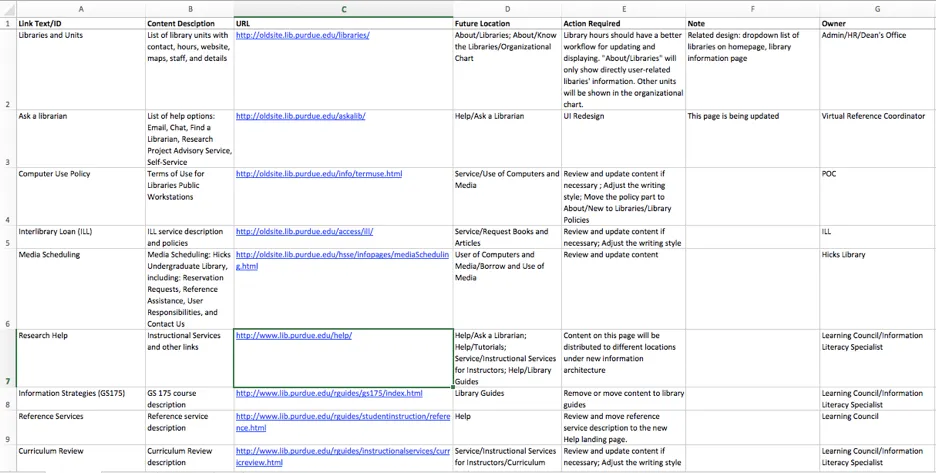
I did an inventory of content on the legacy libraries website. This is important for me to understand the scale of content issues and clean up content that’s no longer needed. I also used the content inventory results to involve stakeholders (content owners) to improve content quality and consistency.
Sitemap
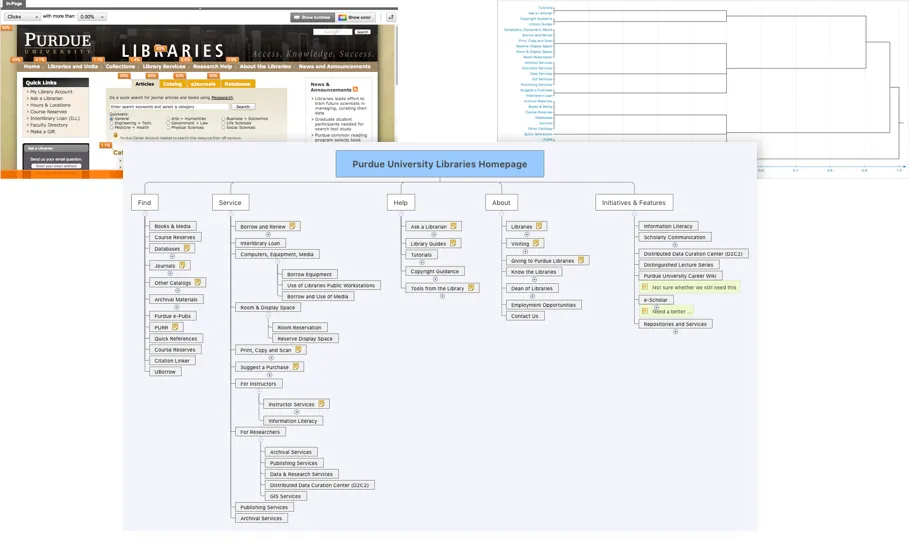
I gathered Google Analytics data and conducted a card sorting exercise with students and librarians, from which I developed a new sitemap as the content structure for the new site.
Homepage
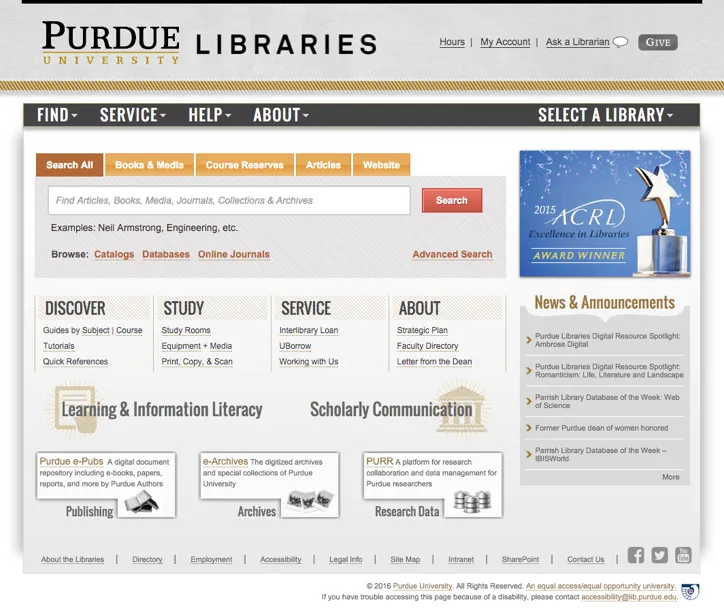
I simplified the homepage by organizing less used links into navigation menus and simplifying the search UI. I tightened up frequently used links under the search and grouped them by user needs.
Library hours
Purdue Libraries have a number of locations scatter around the campus. Each library has its own collections, services, and hours. Through research I learned that an important need for students was to check the library hours. The legacy list of libraries had a link to hours under each library, and the link opened a small popover. This made hard for users, particularly students, to scan for library hours and see which library is open.

I experimented a few ideas for showing the library hours. My test with users showed that users liked the straightforward display of the present day’s hours, but they wanted more hours information than the present day, particularly over the weekend. I also learned that hiding the hours in the select a library dropdown menu created discoverability issues, and users didn’t like hover and visually scan the hours.

I talked to library staff and learned that the library hours didn’t change a lot in an academic year. So I used a simple table to show the hours by days in a week. I used simple tabs for switching to holiday breaks or the other semester. This simple table without any UI interaction actually worked the best for users.

Search
Search is the core part of the libraries website. At the time, the development team were implementing a federated search tool which searches across library collections and resources. The initial UI looked like below.

On the left of the search UI were facets for filtering the search results. However, the telemetry data showed that those facets were not well utilized. To solve this, I did a visually refresh on the initial UI and particularly on the facets. I wanted to collapse the facets to make them less overwhelming and give users a better idea of all the available facets.

The redesigned facet UI increased the usage by about 10%.

Responsive
Later in this project, Purdue University introduced new branding and visual design system. I updated the homepage design to follow the new system and also improved its responsiveness.
